
Natural Notes +4.1 - Google Play
You'll be able to see results in few seconds.
Publisher Description

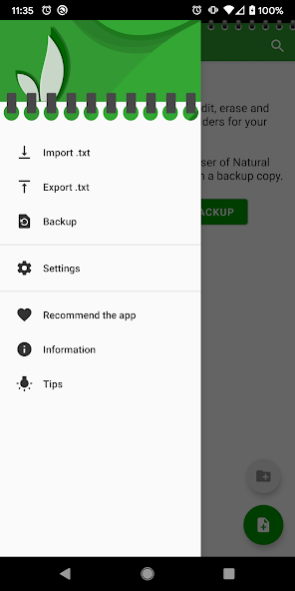
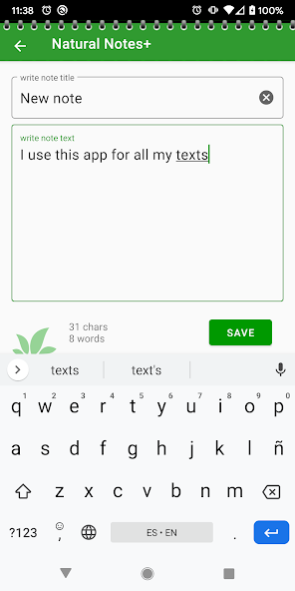
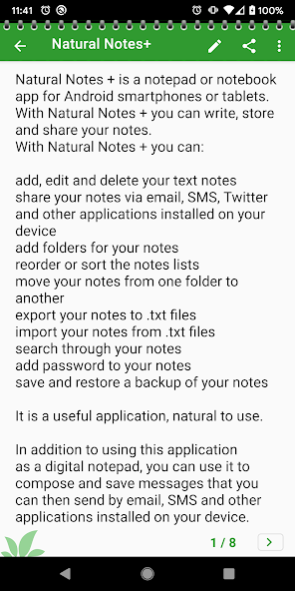
We are aware that there are many notes app for Android, what makes our different?
This is our attempt of combining useful and the easy to use.
It is probably not the notebook with most features, but we wanted to write things down in 2 seconds and have them always handy.
That is why we made Natural Notes, a free notebook app and you're welcome to try it.
If you liked it, you may feel the need to have some more features, like protect your notes with a password, export note to txt file, import a note from another txt file, you may want the text size a bit bigger ... we have added the options that we realized we needed in a natural way.
If we are lucky and you choose Natural Notes + to manage your notes on your mobile device, your comments and suggestions are welcome at info@naturalapps.com email
We have been very careful to not make it too complicated but we have not lost functionality.
This app is not cloud based, so the information you enter into the app will be saved on the internal memory of your device.
Your backups use the internal memory. This app needs access permission during backup or restore operations. You, the user, choose the destination where to save the backup copy in Settings.
Added option to open any .txt file on the device with Natural Notes + and save it as a note (.txt files you receive via Bluetooth, as an email attach, etc).
Added option to share your notes as .txt files for email attach, Bluetooth, etc.
Added option to import / export whole folders of .txt files
Added option to install or mover the app to the SD card (on Android versions that allow this)
Improved design for large 10 inch tablets
You can now password protect whole folders
All password protected notes and folders have new icons
Improved italian translation. Thank you Vittorio!
EASY AND USEFUL.
Added option to import / export whole folders of .txt files
Added option to install or mover the app to the SD card (on Android versions that allow this)
New design for large 10 inch HoneyComb tablets.
Improved opening speed of the app
Improved french translation. Thank you Philippe!
If there is no title for the note it will set automatically.
Improved design on Android Ice Cream and Jelly Bean versions.
Added more options to the Settings screen.
Double tap note text to open edit mode.
Added option to insert date and time to text, title or folder name on double tap.
More control over your backups and exported txt files: you can now choose the folder on your device in the settings screen.
LATEST NEW FEATURES
- modernized look
- added list items multiselect on long press
- improved backup and restore functions
- added duplicate note function
- added tips
- improved reorder list, now drag and drop
- added automatic backup function
- added an "export-notes-to-txt" screen, to make it easier to manage your data. From here you can export ALL your notes to txt files in one go
- added optional biometric fingerprint protection instead of password protection for notes and folders
- added a export-and-send a whole folder of notes as txt files with Drive, email, etc
About Natural Notes +
The company that develops Natural Notes + is Natural Apps. The latest version released by its developer is 4.1.
To install Natural Notes + on your Android device, just click the green Continue To App button above to start the installation process. The app is listed on our website since 2020-04-27 and was downloaded 0 times. We have already checked if the download link is safe, however for your own protection we recommend that you scan the downloaded app with your antivirus. Your antivirus may detect the Natural Notes + as malware as malware if the download link to com.naturalapps.notasplus is broken.
How to install Natural Notes + on your Android device:
- Click on the Continue To App button on our website. This will redirect you to Google Play.
- Once the Natural Notes + is shown in the Google Play listing of your Android device, you can start its download and installation. Tap on the Install button located below the search bar and to the right of the app icon.
- A pop-up window with the permissions required by Natural Notes + will be shown. Click on Accept to continue the process.
- Natural Notes + will be downloaded onto your device, displaying a progress. Once the download completes, the installation will start and you'll get a notification after the installation is finished.
Program Details
System requirements
Download information
Pricing
Version History
version 4.1
posted on 2020-04-27
- fixed alphabetical order bug
version 4.0
posted on 2020-04-16
- modernized look
- added list items multiselect on long press
- improved backup and restore functions
- added duplicate note function
- added tips
- improved reorder list, now drag and drop
- added automatic backup function
- added an "export-notes-to-txt" screen, to make it easier to manage your data. From here you can export ALL your notes to txt files in one go
- added optional biometric fingerprint protection instead of password protection for notes and folders
version 3.0
posted on 2015-11-03
Improved backup file path, now includes date/time,Added easy option to send your backup copies to the cloud,Added option to create and move folders within folders,Added UTF-8 encoding support for txt files,Upgraded to new Android MarshMallow permission system,And a few bug fixes,Design upgrade coming soon.
Disclaimer
Official Google Play Link
We do not host Natural Notes + on our servers. We did not scan it for viruses, adware, spyware or other type of malware. This app is hosted by Google and passed their terms and conditions to be listed there. We recommend caution when installing it.
The Google Play link for Natural Notes + is provided to you by apps112.com without any warranties, representations or guarantees of any kind, so access it at your own risk.
If you have questions regarding this particular app contact the publisher directly. For questions about the functionalities of apps112.com contact us.
